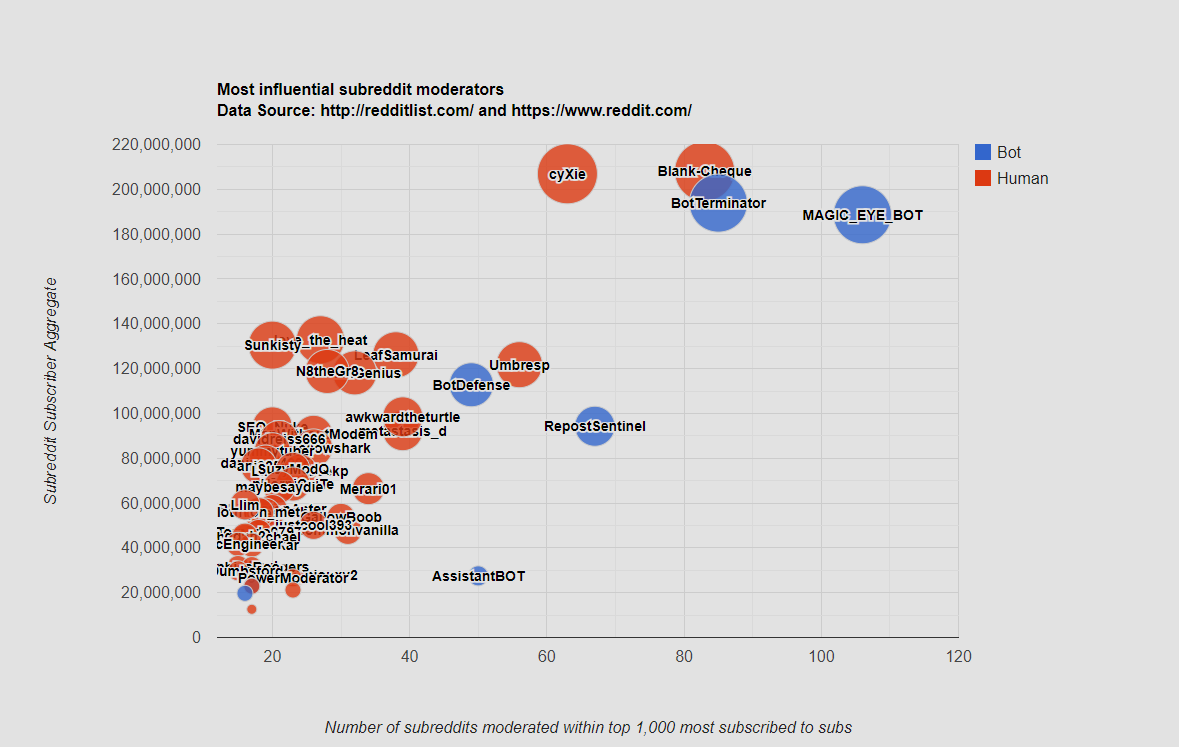
Plotting number of subreddits moderated within top 1,000 most subscribed subs, vs. Subreddit Subscriber Aggregate.
Click on images below to enlarge.

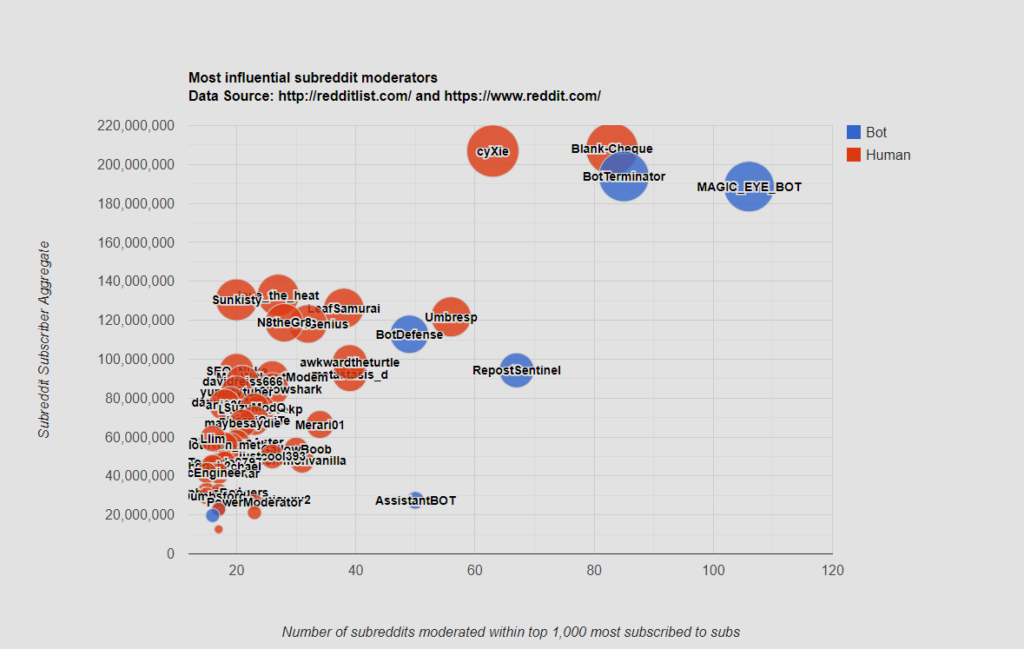
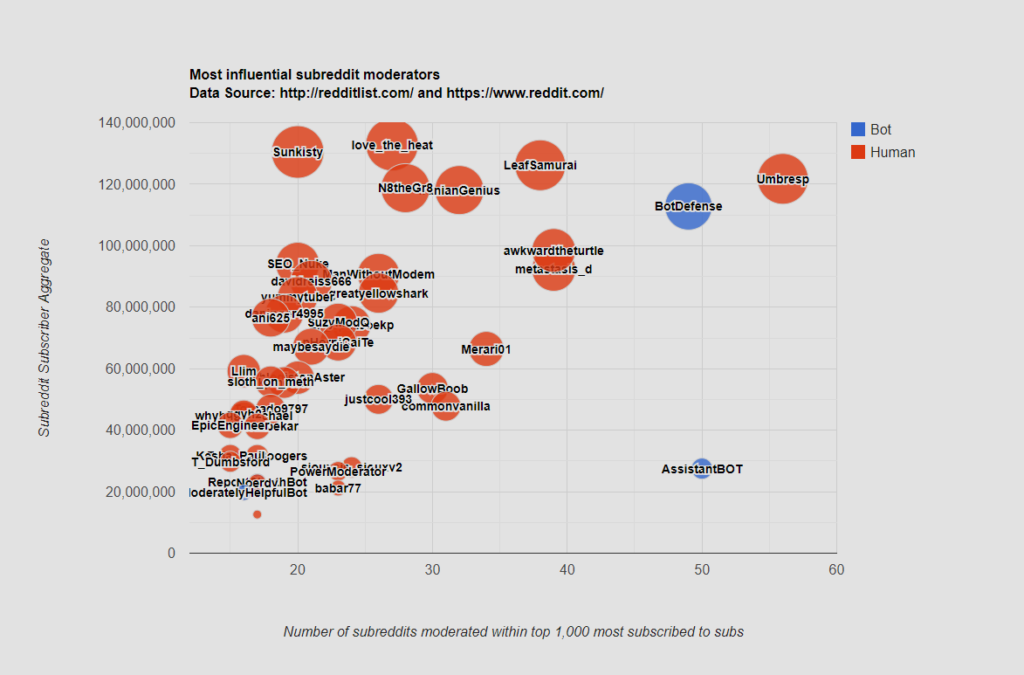
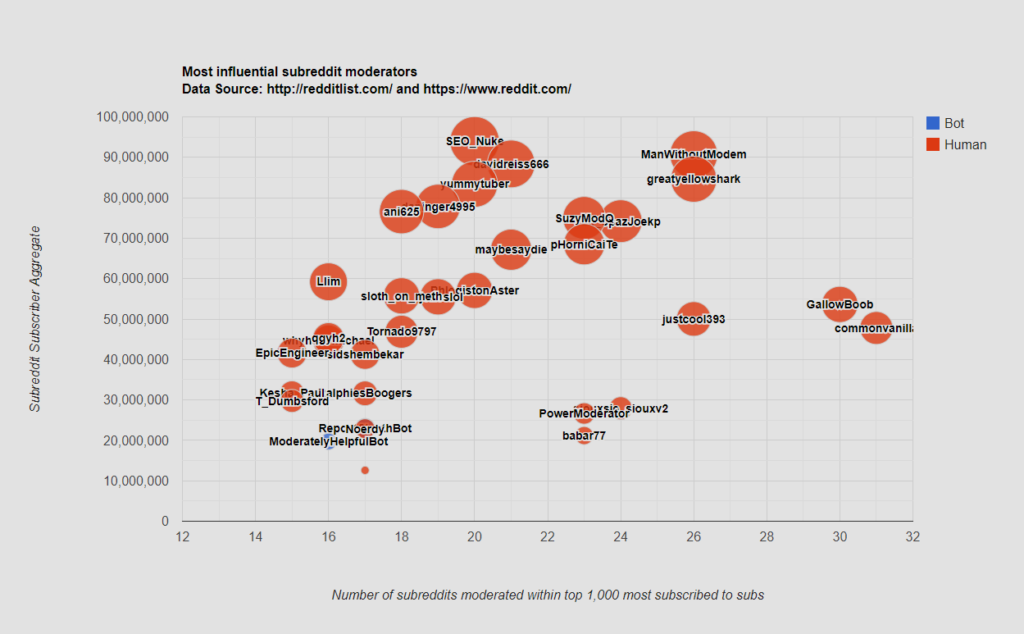
The data is from http://redditlist.com/ and https://www.reddit.com/. C# was written to parse both websites and generate output formatted for a GoogleCharts Bubble Chart. This script was ran on 5/14/2020.
If you would like to parse the top 1,000 most subscribed-to subreddit mod usernames, and aggregate their frequency yourself. Feel free to download visual studio and run the code below in a simple .NET Console Application. Of course this being a hard parse it is only bound to work so long as redditlist and reddit don’t change their html structure, otherwise it can be used as a reference.
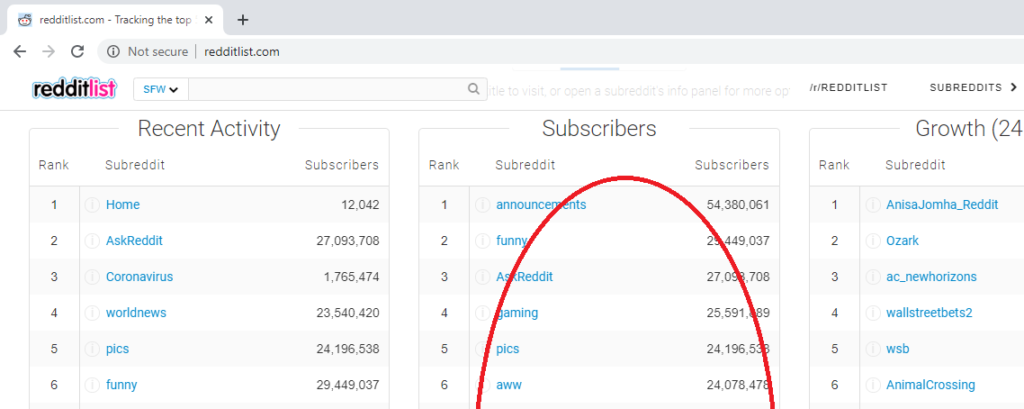
Crawl redditlist.com
Collect the middle column for the first 8 pages listing 125 each.
Crawl reddit.com
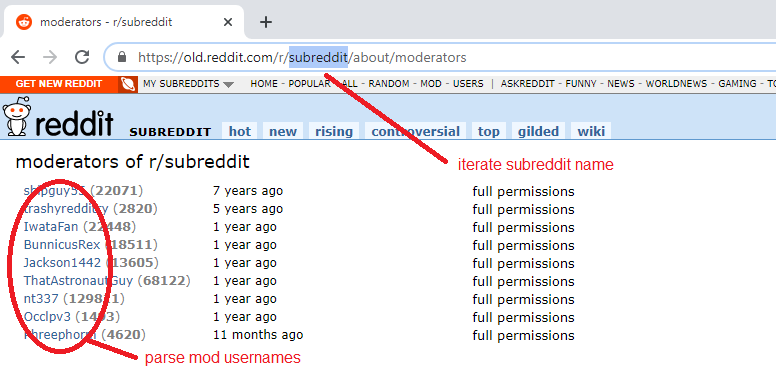
Iterate over each subreddit’s /about/moderators page and collect usernames shown below.
Regular Expression patterns used to collect information:
@"_blank(.*?)</div>"
@">(.*?)</a>"
@"listing-stat'>(.*?)</span>"
@"<span class=""user""><a href=""https://old.reddit.com/user/(.*?)/" |
@"_blank(.*?)</div>"
@">(.*?)</a>"
@"listing-stat'>(.*?)</span>"
@"<span class=""user""><a href=""https://old.reddit.com/user/(.*?)/"
C# .NET Console Application
using System;
using System.Collections.Generic;
using System.IO;
using System.Linq;
using System.Net;
using System.Text;
using System.Text.RegularExpressions;
using System.Threading.Tasks;

namespace RedditMegaModBubbleParse
{
    class Program
    {
        static void Main(string[] args)
        {

            Dictionary<string, int> dictSub_SubscriberCount = new Dictionary<string, int>();

            //PARSE TOP 1000 Subreddit names and subscribers//
            List<string> top500Subreddits = new List<string>();
            for (int page = 1; page < 9; page++)
            {
                WebClient wc = new WebClient();
                string htmlString = wc.DownloadString("http://redditlist.com/?page=" + page);
                MatchCollection matches = Regex.Matches(htmlString, @"_blank(.*?)</div>", RegexOptions.Singleline);
                int count = 0;
                foreach (Match match in matches)
                {
                    if (count > 125 && count <= 250)
                    {
                        Console.WriteLine(count);
                        string sHtmlChunk = match.Groups[1].Value;
                        Match mSubName = Regex.Match(sHtmlChunk, @">(.*?)</a>");
                        Match mSubscriberCount = Regex.Match(sHtmlChunk, @"listing-stat'>(.*?)</span>");
                        if (mSubName.Success && mSubscriberCount.Success)
                        {
                            string sSubName = mSubName.Groups[1].Value;
                            Console.WriteLine("Subreddit Name : " + sSubName);
                            string sSubscriberCount = mSubscriberCount.Groups[1].Value;
                            int iSubscriberCount = int.Parse(Regex.Replace(sSubscriberCount, ",", ""));
                            Console.WriteLine("Subreddit Count : " + iSubscriberCount);
                            dictSub_SubscriberCount.Add(sSubName, iSubscriberCount);
                        }
                        Console.WriteLine();
                    }
                    count += 1;
                }
            }

            Dictionary<string, int> dictModCount = new Dictionary<string, int>();
            Dictionary<string, int> dictModSubscriberAggregate = new Dictionary<string, int>();

            int count_sub = 0;
            foreach (string subreddit_name in dictSub_SubscriberCount.Keys)
            {
                try
                {
                    count_sub += 1;
                    Console.WriteLine("*** Subreddit " + count_sub + " ~~~ " + "[" + subreddit_name + "] ***");
                    WebClient wc = new WebClient();
                    string subreddit_clean = Regex.Replace(subreddit_name, " ", "");
                    string url_glue = "https://old.reddit.com/r/" + subreddit_clean + "/about/moderators";
                    Console.WriteLine(url_glue);
                    string htmlString = wc.DownloadString(url_glue);
                    MatchCollection matches = Regex.Matches(htmlString, @"<span class=""user""><a href=""https://old.reddit.com/user/(.*?)/", RegexOptions.Singleline);
                    foreach (Match match in matches)
                    {
                        Console.WriteLine(match.Groups[1].Value);
                        string modname = match.Groups[1].Value;

                        if (dictModCount.ContainsKey(modname))
                        {
                            int existingcount = dictModCount[modname];
                            existingcount += 1;
                            dictModCount[modname] = existingcount;

                            int existingSubscriberCount = dictModSubscriberAggregate[modname];
                            existingSubscriberCount += dictSub_SubscriberCount[subreddit_name];
                            dictModSubscriberAggregate[modname] = existingSubscriberCount;

                        }
                        else
                        {
                            dictModCount.Add(modname, 1);
                            dictModSubscriberAggregate.Add(modname, dictSub_SubscriberCount[subreddit_name]);
                        }
                    }
                }
                catch (Exception x)
                {
                    Console.WriteLine("ERROR ACCESSING SUBREDDIT  INVITE ONLY!!!!!!!");
                }
            }

            Console.WriteLine();

            string masteroutput = "";
            foreach (KeyValuePair<string, int> item in dictModCount.OrderByDescending(key => key.Value))
            {
                Console.WriteLine("['"+item.Key + "', " + item.Value+", "+ dictModSubscriberAggregate[item.Key]+", '1' , "+ dictModSubscriberAggregate[item.Key] + " ],");
                masteroutput += "['" + item.Key + "', " + item.Value + ", " + dictModSubscriberAggregate[item.Key] + ", '1' , " + dictModSubscriberAggregate[item.Key] + " ],\r\n";
            }

            //save to C:\Airplanes\
            StreamWriter streamWrite;
            streamWrite = File.AppendText("C:\\Airplanes\\output.txt");
            streamWrite.WriteLine(masteroutput);
            streamWrite.Close();

            Console.ReadLine();

        }
    }
} |
using System;
using System.Collections.Generic;
using System.IO;
using System.Linq;
using System.Net;
using System.Text;
using System.Text.RegularExpressions;
using System.Threading.Tasks;
namespace RedditMegaModBubbleParse
{
class Program
{
static void Main(string[] args)
{
Dictionary<string, int> dictSub_SubscriberCount = new Dictionary<string, int>();
//PARSE TOP 1000 Subreddit names and subscribers//
List<string> top500Subreddits = new List<string>();
for (int page = 1; page < 9; page++)
{
WebClient wc = new WebClient();
string htmlString = wc.DownloadString("http://redditlist.com/?page=" + page);
MatchCollection matches = Regex.Matches(htmlString, @"_blank(.*?)</div>", RegexOptions.Singleline);
int count = 0;
foreach (Match match in matches)
{
if (count > 125 && count <= 250)
{
Console.WriteLine(count);
string sHtmlChunk = match.Groups[1].Value;
Match mSubName = Regex.Match(sHtmlChunk, @">(.*?)</a>");
Match mSubscriberCount = Regex.Match(sHtmlChunk, @"listing-stat'>(.*?)</span>");
if (mSubName.Success && mSubscriberCount.Success)
{
string sSubName = mSubName.Groups[1].Value;
Console.WriteLine("Subreddit Name : " + sSubName);
string sSubscriberCount = mSubscriberCount.Groups[1].Value;
int iSubscriberCount = int.Parse(Regex.Replace(sSubscriberCount, ",", ""));
Console.WriteLine("Subreddit Count : " + iSubscriberCount);
dictSub_SubscriberCount.Add(sSubName, iSubscriberCount);
}
Console.WriteLine();
}
count += 1;
}
}
Dictionary<string, int> dictModCount = new Dictionary<string, int>();
Dictionary<string, int> dictModSubscriberAggregate = new Dictionary<string, int>();
int count_sub = 0;
foreach (string subreddit_name in dictSub_SubscriberCount.Keys)
{
try
{
count_sub += 1;
Console.WriteLine("*** Subreddit " + count_sub + " ~~~ " + "[" + subreddit_name + "] ***");
WebClient wc = new WebClient();
string subreddit_clean = Regex.Replace(subreddit_name, " ", "");
string url_glue = "https://old.reddit.com/r/" + subreddit_clean + "/about/moderators";
Console.WriteLine(url_glue);
string htmlString = wc.DownloadString(url_glue);
MatchCollection matches = Regex.Matches(htmlString, @"<span class=""user""><a href=""https://old.reddit.com/user/(.*?)/", RegexOptions.Singleline);
foreach (Match match in matches)
{
Console.WriteLine(match.Groups[1].Value);
string modname = match.Groups[1].Value;
if (dictModCount.ContainsKey(modname))
{
int existingcount = dictModCount[modname];
existingcount += 1;
dictModCount[modname] = existingcount;
int existingSubscriberCount = dictModSubscriberAggregate[modname];
existingSubscriberCount += dictSub_SubscriberCount[subreddit_name];
dictModSubscriberAggregate[modname] = existingSubscriberCount;
}
else
{
dictModCount.Add(modname, 1);
dictModSubscriberAggregate.Add(modname, dictSub_SubscriberCount[subreddit_name]);
}
}
}
catch (Exception x)
{
Console.WriteLine("ERROR ACCESSING SUBREDDIT INVITE ONLY!!!!!!!");
}
}
Console.WriteLine();
string masteroutput = "";
foreach (KeyValuePair<string, int> item in dictModCount.OrderByDescending(key => key.Value))
{
Console.WriteLine("['"+item.Key + "', " + item.Value+", "+ dictModSubscriberAggregate[item.Key]+", '1' , "+ dictModSubscriberAggregate[item.Key] + " ],");
masteroutput += "['" + item.Key + "', " + item.Value + ", " + dictModSubscriberAggregate[item.Key] + ", '1' , " + dictModSubscriberAggregate[item.Key] + " ],\r\n";
}
//save to C:\Airplanes\
StreamWriter streamWrite;
streamWrite = File.AppendText("C:\\Airplanes\\output.txt");
streamWrite.WriteLine(masteroutput);
streamWrite.Close();
Console.ReadLine();
}
}
}
Congrats to the May 2020 top 50 Reddit Megamods
In order of the most subreddits modded within top 1,000 most subscribed-to subreddits.
AutoModerator MAGIC_EYE_BOT BotTerminator Blank-Cheque RepostSentinel cyXie Umbresp AssistantBOT BotDefense metastasis_d awkwardtheturtle LeafSamurai Merari01 IranianGenius commonvanilla GallowBoob N8theGr8 love_the_heat ManWithoutModem greatyellowshark justcool393 Lil_SpazJoekp siouxsie_siouxv2 SuzyModQ pHorniCaiTe babar77 PowerModerator maybesaydie davidreiss666 Sunkisty yummytuber SEO_Nuke PhlogistonAster daninger4995 kjoneslol sloth_on_meth ani625 Tornado9797 sidshembekar RalphiesBoogers RepostSleuthBot Noerdy stuffed02 whyhellomichael qgyh2 Llim ModeratelyHelpfulBot EpicEngineer T_Dumbsford Kesha_Paul