
Monthly Archives: March 2012

LOL! Big Data Analytics!

So what’s the best way to compare data?


Say you have a bunch of different data, of all different types and sizes.
You’ve got Square Data and Circle Data.

 

And Square Data is Different from Circle Data.
You know they are both Shapes, but one has 4 corners and the other has 0 corners.
“and thats ridiculous!” from either perspective.

Also, if we look closer we can see that circle data looks like this.

And Square Data looks like this.

Well, I can’t compare this “J” with “l” ! >:O


WHAT AN OUTRAGE!  This is very frustrating! >:<

. . .

But WHAT IF!  I had even more granular data about each J and l?

And ‘J’ looked like this.

And  ‘l’ looked like this.

:D!   Fantastic!  They have something in common!  COLORS !

“boring!”

meh, so now what? Well, we can record the frequency of each color related to each individual ‘J’ or ‘l’.

“so what?”

And then we can sort the color data of each J or l from most frequent to least.

“lame…”
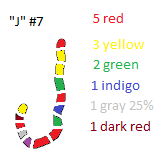
“._.”

Then we can take the top x most frequent colors and call that a set (set of colors for each J and l).  So now, by putting emphasis on frequency we can attempt to make relevance!

“Whatever!”

We can now play with Data!

We can figure out and see what the most optimal algorithm for DataSet Comparison is!  Is it top 5 most frequent terms of “J” compared with the top 5 most frequent terms of “l” with at least 2 matches make a relation between “J” and “l”? Maybe its top 15 compared with the top 50 with x matches?  Maybe 5 vs. 15 with x matches?

If the colors were “special” words I find that the  top 10 vs. top 10 with 4 matches or more, works best.  But this could change at any moment!  I could wake up tomorrow and decide differently.  There is no absolute truth here,  teh absolute truth is in teh data!

:D


C#: How to read from Microsoft PowerPoint file ppt

Get the text out of each PowerPoint slide.

 
using System;
using System.Collections.Generic;
using System.Linq;
using System.Text;
using Microsoft.Office.Core;
using PowerPoint = Microsoft.Office.Interop.PowerPoint;
 
namespace readPPT
{
    class Program
    {
        static void Main(string[] args)
        {
            Microsoft.Office.Interop.PowerPoint.Application PowerPoint_App = new Microsoft.Office.Interop.PowerPoint.Application();
            Microsoft.Office.Interop.PowerPoint.Presentations multi_presentations = PowerPoint_App.Presentations;
            Microsoft.Office.Interop.PowerPoint.Presentation presentation = multi_presentations.Open(@"C:\PPT\myPowerpoint.pptx");
            string presentation_text = "";
            for (int i = 0; i < presentation.Slides.Count; i++)
            {
                foreach (var item in presentation.Slides[i+1].Shapes)
                {
                    var shape = (PowerPoint.Shape)item;
                    if (shape.HasTextFrame == MsoTriState.msoTrue)
                    {
                        if (shape.TextFrame.HasText == MsoTriState.msoTrue)
                        {
                            var textRange = shape.TextFrame.TextRange;
                            var text = textRange.Text;
                            presentation_text += text+" ";
                        }
                    }
                }
            }
            PowerPoint_App.Quit();
            Console.WriteLine(presentation_text);
        }
    }
}

C#: How to (parse the text content)/ read from Microsoft Word Document doc

Get the Text out of a Microsoft word file. Read from MS word.

using System;
using System.Collections.Generic;
using System.Linq;
using System.Text;
using System.Runtime.InteropServices.ComTypes;
 
namespace readDOC
{
    class Program
    {
        static void Main(string[] args)
        {
            Microsoft.Office.Interop.Word.Application word = new Microsoft.Office.Interop.Word.Application();
            object miss = System.Reflection.Missing.Value;
            object path = @"C:\DOC\myDocument.docx";
            object readOnly = true;
            Microsoft.Office.Interop.Word.Document docs = word.Documents.Open(ref path, ref miss, ref readOnly, ref miss, ref miss, ref miss, ref miss, ref miss, ref miss, ref miss, ref miss, ref miss, ref miss, ref miss, ref miss, ref miss);
            string totaltext = "";
            for (int i = 0; i < docs.Paragraphs.Count; i++)
            {
                   totaltext += " \r\n "+ docs.Paragraphs[i+1].Range.Text.ToString();
            }
            Console.WriteLine(totaltext);
            docs.Close();
            word.Quit();
        }
    }
}

Java: Protege Frames: How to get a distinct list of all possible Slots within a Project.

If for whatever reason you might need this list. All you have to do is loop through the Cls’s, then loop through the Slots of the Cls’s, using the method .getOwnSlots()

More Protege Frames how-to’s here http://mantascode.com/?p=507

import java.util.ArrayList;
import java.util.Collection;
import java.util.HashSet;
import java.util.Iterator;
 
import edu.stanford.smi.protege.model.Cls;
import edu.stanford.smi.protege.model.KnowledgeBase;
import edu.stanford.smi.protege.model.Project;
 
//This Program will output a complete list of distinct slots within a Protege Frames Project file.
 
public class jokke
{
      private static final String PROJECT_FILE_NAME = "C:\\MC\\RadLex.pprj";
      public static void main(String[] args)
      {
            HashSet idsLoaded = new HashSet();
            Collection errors = new ArrayList();
        Project project = new Project(PROJECT_FILE_NAME, errors);
        KnowledgeBase kb = project.getKnowledgeBase();
        ArrayList distinctSlotList = new ArrayList();
        //get Class iterator
        Iterator radClsIter = kb.getClses().iterator();
        //loop through each class
        while ( radClsIter.hasNext())
        {
            //get Cls object
            Cls currentClass = (Cls) radClsIter.next();
            //String for a comma deliminated list of slots
            String slotsString = currentClass.getOwnSlots().toString();
            String [] clsSlotComponents = slotsString.split(",");
            //loop through each slot
            for ( int i = 0 ; i &lt;  clsSlotComponents.length; i++ )
            {
                  //check to see if particular slot already exists in ArrayList
                  if ( distinctSlotList.contains(clsSlotComponents[i].trim().replaceAll("\\[|\\]", "")))
                  {}
                  else
                  {
                        distinctSlotList.add(clsSlotComponents[i].trim().replaceAll("\\[|\\]", ""));
                  }
            }
        }
 
        Iterator iterator = distinctSlotList.iterator();
        while(iterator.hasNext())
        {
            System.out.println(iterator.next());
        }
      }
}